Get Full Government Meeting Transcripts, Videos, & Alerts Forever!
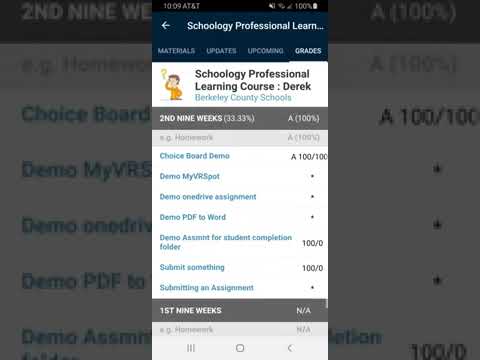
How to check grades in the Schoology app
5920712 · August 22, 2025
AI-Generated Content: All content on this page was generated by AI to highlight key points from the meeting. For complete details and context, we recommend watching the full video. so we can fix them.
Summary
A short instructional video demonstrates two ways to view course grades in the Schoology mobile app, how grade pages are organized and what an asterisk on an assignment means.
An unidentified presenter demonstrated two ways to view course grades in the Schoology mobile app and explained what the app’s grade page displays.
The video shows step-by-step navigation for both methods and notes that an asterisk indicates an ungraded assignment, a detail students and parents can use when tracking…
Already have an account? Log in
Subscribe to keep reading
Unlock the rest of this article — and every article on Citizen Portal.
- Unlimited articles
- AI-powered breakdowns of topics, speakers, decisions, and budgets
- Instant alerts when your location has a new meeting
- Follow topics and more locations
- 1,000 AI Insights / month, plus AI Chat
30-day money-back on paid plans