Get Full Government Meeting Transcripts, Videos, & Alerts Forever!
Get email alerts on the Deferred Compensation Reporting topic
No spam. Unsubscribe anytime.
TRS training explains SSP (457(b)) reporting in Gemini employer portal
Summary
Angie Gerlach, deferred compensation analyst at the Teachers' Retirement System, led a recorded TRS training session on SSP deferred‑compensation reporting in the Gemini Employer Portal (date not specified), explaining when and how to submit reports, how to resolve common edits, and how to authorize payments to Voya.
Angie Gerlach, deferred compensation analyst at the Teachers' Retirement System, led a recorded TRS training session on the Supplemental Savings Plan (SSP) deferred‑compensation reporting process and the Gemini Employer Portal (date not specified). Gerlach explained when the SSP deferrals report is generated, the two methods employers can use to submit contributions, how to resolve common edits flagged by Gemini, and steps to authorize payments that trigger ACH transfers to Voya.
Gerlach said, "SSP deferred compensation reporting plays a very important role, not just for you as reporting or payroll officer at your district, but for every employee who participates in the SSP." She emphasized that pulling the most recent SSP deferrals report immediately before payroll close helps ensure withheld contributions match employee elections and are sent to Voya for investment promptly.
Why this matters: the deferrals report is the employer’s signal that an SSP election has changed (new enrollment, change, or cancellation). A timely report both starts the funds transfer to Voya and prevents withholding or posting errors that could require refunds or corrections on payroll.
Key points from the training
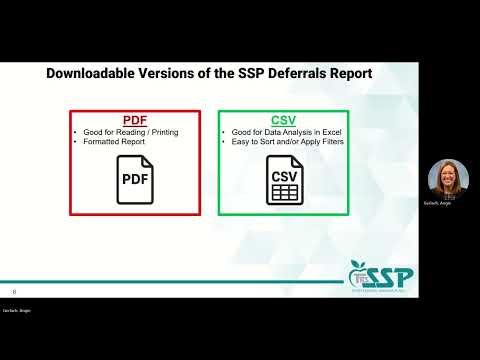
• When reports generate and how to access them: TRS generates a new SSP deferrals report whenever an employee enrolls, updates, or cancels a deferral. Notifications come from trsGeminimessenger@trsil.org; employers may download the report as PDF for print‑friendly review or CSV for analysis in Excel. Gerlach recommended adding the sender to a safe‑senders list to avoid missed reports.
• Differences from defined‑benefit (DB) reporting: Gerlach noted four main differences: SSP reporting uses a calendar‑year cycle (important for contribution‑limit monitoring), SSP amounts should be reported as close to the employee pay date as administratively possible (rather than DB’s month‑following schedule), summer payrolls must be reported when paid for SSP (DB summer payrolls report by July 10), and different TRS contact options are used for SSP versus DB questions (ssp@trsil.org and the SSP call center option noted in the training).
• Submission methods in Gemini: employers may use replication (data entry/replication) or file upload. Gemini defaults to the district’s DB method unless TRS staff are asked to change it. Replication copies an existing report and shows a Replication Results Summary with counts of replicated and rejected records, links to an error report, and totals for employer and member contributions. File upload requires selecting the payroll‑generated file, uploading it, then following the same Results Summary workflow.
• Payment authorization and timing: after certifying report totals, employers enter Member and Employer contribution totals, choose an authorization date, and click Process Payment and Confirm. Gerlach said payments submitted before 2:00 p.m. on a business day will be sent to Voya that same business day; payments after 2:00 p.m. are processed the next business day. Once the authorization date is set and confirmed, it cannot be changed.
• Common edits and how to resolve them: Gerlach reviewed specific Gemini edit codes and how employers should respond: - ER5055 (contribution mismatch): Occurs when the amount reported does not match payroll withholding. If payroll shows the reported amount is correct, the employer may certify the warning in Gemini after verifying payroll records; otherwise update the reported amount to match payroll. Gerlach demonstrated both full edit and quick edit flows. - ER4059 (contribution category mismatch): Triggers when the reported contribution category (for example, pretax vs. Roth) does not match the SSP deferrals report. This is a fatal edit and must be corrected (via quick edit or edit details) before submission. - ER401 (record for non‑enrollee): Occurs when a district attempts to report a contribution for an employee not on the deferrals report. Employers must not deduct the deferral; if payroll did withhold it, the employer must refund the contribution and delete the record from Gemini. Gerlach reiterated the effective‑date rule: withhold on the first pay period with a pay‑period begin date on or after the contribution effective date; if a deferral is canceled, stop withholding immediately. - ER5086 (contribution limit warning) and ER5090 (reported amount exceeds annual 457(b) limit): ER5086 is a warning that a member is approaching the plan/IRS limit and must be certified before proceeding. ER5090 is fatal and requires reducing or removing the contribution so the member does not exceed the annual 457(b) limit; any excess must be refunded on payroll and deductions stopped for the remainder of the calendar year. The training referenced the annual IRS 457(b) contribution limit but did not state a dollar amount during the session (amount not specified in the training).
• Error‑handling workflow: Gerlach framed the process as Find, Fix, Review, Save. Employers cannot submit a report while any fatal edits remain. The Gemini summary provides an error report PDF listing affected records, edit numbers, and suggested fixes.
• Portal tips and reports: Gerlach demonstrated delete, add record, copy record, quick edit, search by last name, and view‑all or errors‑only filters in Gemini. She also showed how to pull a Year‑To‑Date (YTD) SSP deferred‑comp report (Services → TRS reports → Year to date report → SSP deferred comp → calendar year) to reconcile reported contributions.
• Help and resources: Gerlach listed TRS support channels for SSP reporting: email ssp@trsil.org and the SSP call center (phone options specified in the training). She also identified local Voya retirement education specialists in Illinois (Stacy Russell and Terry Bailey) as resources for employer and employee education and offered links and TRS/Gemini resources included in the training materials.
What the training did not specify
• The training referred repeatedly to the IRS annual 457(b) contribution limit and used internal edit codes, but it did not provide an explicit dollar amount for the IRS limit during the recorded session. Employers should consult current IRS guidance or TRS plan documents for the applicable annual deferral amounts.
Ending
Gerlach closed by urging employers to review the SSP deferrals report before each pay period and to use Gemini’s error reports and YTD tools to reconcile payroll and reported amounts. She noted TRS and Voya support contacts and invited employers to use the provided links and phone/email channels for follow‑up assistance.