Get Full Government Meeting Transcripts, Videos, & Alerts Forever!
Get email alerts on the Student Registration topic
No spam. Unsubscribe anytime.
Salt Lake City School District demonstrates online student registration with one-time password
Summary
A district demonstration explains how parents and legal guardians can register students online by requesting a one-time password sent to the email on file for the student's parent contact and verifies student information before completing registration.
Salt Lake City School District staff provided a short demonstration showing how parents and legal guardians can register students online by requesting a one-time password sent to the email address listed on the student's parent contact. The demonstration covered how to request the one-time passcode, enter it, verify student details and complete registration, and how to register new students who have not previously attended the district.
The demonstration matters because accurate parent contact information and successful online registration ensure students are enrolled and assigned to the correct school and grade before the term starts. The district advised parents to verify school and grade details and to contact the student's school for additional support if they cannot complete the process online.
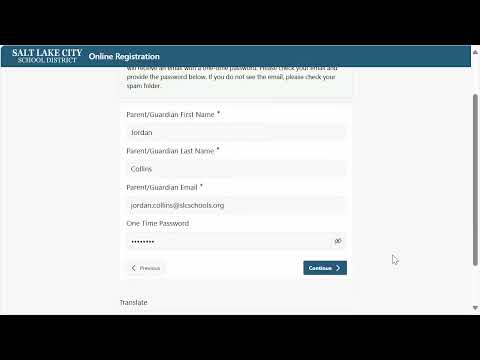
In the step-by-step demonstration, a staff member instructs parents to click the “register using a 1 time code sent to your parent email” button and to provide the email address associated with the parent contact. "This is a quick demonstration on registering your students with Salt Lake City School District by requesting a 1 time password to the email address associated with the parent contacts for your student," the presenter said. The presenter then told users to click the request 1 time password button and check their email for the passcode, noting that parents should check spam folders if they do not see the message.
The presenter showed an example email and said parents should copy the one-time passcode into the one-time password field on the registration site and click continue to log in. After logging in, the page lists students associated with the provided email; the presenter said a student will appear only if the registrant is the mother, father or legal guardian listed as a parent contact. The presenter instructed parents to verify that the grade and school information is correct and to click the register button to begin the registration process.
For guardians registering students who have never attended the Salt Lake City School District, the presenter noted a separate "register new student" button on the right of the page. The demonstration concluded with guidance to contact the student's school for additional support with online registration or associating students with parent contact information, and a reminder to click sign out when finished.
The presentation provided procedural instructions only; it did not include policy changes, legal references, or required documentation beyond the parent contact email and the requirement that the registrant be the student's parent or legal guardian.