Get Full Government Meeting Transcripts, Videos, & Alerts Forever!
Get email alerts on the Etpl Renewal topic
No spam. Unsubscribe anytime.
Utah DWS provides step-by-step guidance to renew programs on Eligible Training Provider List
Summary
Utah Department of Workforce Services ETPL coordinator Sheila Ulrich walked training providers through the online renewal process, required documents, new mandatory fields and how to report enrollment, employment and wage data for the 07/01/2024–06/30/2025 reporting window.
Sheila Ulrich, ETPL coordinator for the Utah Department of Workforce Services, outlined how training providers should renew programs on the state’s Eligible Training Provider List (ETPL) using jobs.utah.gov, including required documentation, new mandatory questions on the renewal form and how to report student employment and wage data.
The procedures matter because the information entered affects whether programs remain on the ETPL and how employment counselors determine if programs meet time limits attached to grant-funded training. Ulrich said providers must report enrollment and employment outcomes for students who fall within the reporting window of July 1, 2024, through June 30, 2025, and that some program data (employment/wages) must be reported only for students who are six months and 12 months past exit.
Ulrich instructed providers to begin at jobs.utah.gov: sign in, select Training Providers and log in with the school account. “If you are brand new to the renewal process and have never signed in as a training provider before, email me at dws_trainingproviders@utah.gov, and I'll email you a link to create an account with your school,” she said. If a provider forgets a username they should email that address; if they forget a password they should use the site’s “forgot password” prompt.
Providers should check the Documents tab and ensure licensing and policy documents are current for the school and program. Ulrich gave examples: aesthetic schools may need a current license through the Division of Professional Licensing, and CNA programs may need a current Utah nursing assistant registry document. Uploaded files must be PDFs; Word documents are not compatible with the system. Ulrich said out-of-date documents remain visible for historical purposes and cannot be deleted.
To renew a program, use the Programs tab and filter by “Needs renewal.” The renewal application auto-populates with last year’s data; providers should “review each field to ensure accuracy,” Ulrich said. She identified four mandatory questions added last year, including certificate type, whether the program is taught on-site, online or both, and the specific name of the certificate, license or degree awarded. Ulrich emphasized that the program name must match what appears in the provider’s catalog or website and urged providers to verify URLs and program descriptions.
On prerequisites, Ulrich said providers must list any required classes, certificates or degrees. “The reason this is so important is the grant is limited to 24 months,” she said, explaining that employment counselors need accurate program-length information to advise students. Providers should enter tuition and required fees assuming a full-time student and provide an estimated total cost for books and supplies for the entire program (enter zeros if none). They must also state program length in weeks and expected clock or contact hours per week for a full-time student.
The renewal asks whether the institution partners with businesses for hands-on experience; if so, providers should list the employer and how long the partnership has existed. It also asks whether any training or testing is contracted or subcontracted; for example, a CDL school that uses a third-party tester should list that contractor and contact information. For the occupation the training leads to, providers can use the O*NET lookup to select the appropriate occupation.
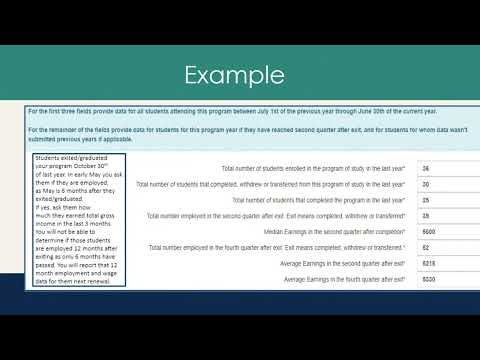
Ulrich explained the data reporting split: for the top three fields in the data section, report all students who attended between 07/01/2024 and 06/30/2025. For employment and wage fields, report only students who are six months and 12 months past the graduation or exit date. She gave an example: a student who exited Oct. 30, 2024, would be eligible for a six-month follow-up in May 2025 and should be included in the six-month employment and wage totals; 12-month information for that student would be reported the next year once 12 months have passed. Ulrich reminded providers that employment and wage data are reported in the aggregate.
On submission, Ulrich said providers should click “Submit for approval” only when the application is complete; using “Save” preserves work but does not send the application to her approval queue. She warned that clicking “Cancel” will delete previously entered information. Ulrich described her review workflow: she reviews each submission and, if she has questions, emails the provider; after her approval a coworker performs secondary approval and a computer-generated email is sent to the school’s primary contact.
For assistance Ulrich repeated the contact email: dws_trainingproviders@utah.gov and reminded providers to upload program-specific documents on the program’s documents section if new or updated documents apply to that program.