Get Full Government Meeting Transcripts, Videos, & Alerts Forever!
Get email alerts on the Online Permitting topic
No spam. Unsubscribe anytime.
Delray Beach staff demonstrates how to apply for building permits through online portal
Summary
A Spanish-language demonstration showed how applicants can use Delray Beach's electronic services portal to start and track building permit requests, add required contacts, attach documents and sign applications.
A staff member from the City of Delray Beach gave a Spanish-language demonstration of the city’s electronic services portal, showing how applicants can start a building-permit application, add required contacts and track progress through the system.
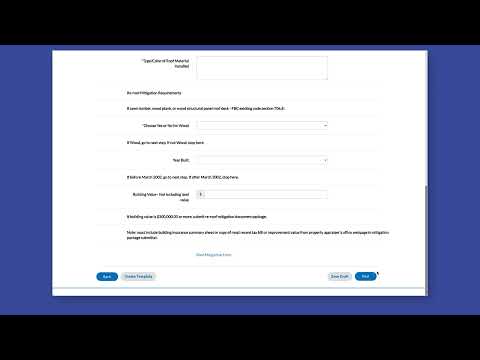
The demonstration explained that applicants should click the Apply button for the permit type they need, choose or add a location, complete required fields, add mandatory contractor and site-owner contacts, attach required documents, sign the application (by drawing or typing a signature) and then review and submit. The presenter showed a progress bar at the top of the application that updates as the submission moves through the system and said that after a successful submission users can click the Permit button to go to their permit page and monitor status.
Why it matters: the portal centralizes permit applications and related services — including business tax receipts, building permits and planning and zoning — and is intended to let applicants track their requests and receive notifications during processing.
Key steps shown in the demonstration include selecting the correct category (the presenter displayed a Show Categories control that filters to business tax receipts, building permits and planning and zoning), using the search column to find existing applications, choosing or adding a location, and adding both contractor and site-owner contacts (the presenter said both are required). The presenter noted that users may save contacts and mark frequent contacts as favorites so they appear under a “My Favorites” tab.
On attachments and signature, the presenter instructed applicants to attach required documents and choose a signature method: place a typed name and let the system create a signature or draw a signature with the mouse. The presenter walked through a final review screen before clicking Send to submit the application.
The demonstration was instructional only; no policy changes, votes or formal actions were described during the presentation. It focused on user steps and portal features rather than approval timelines or fee details.
Community impact: the portal affects Delray Beach permit applicants, including contractors, property owners and local businesses, by providing an online track-and-notify workflow. The presentation did not specify processing times, fees or changes to permitting rules.