Get Full Government Meeting Transcripts, Videos, & Alerts Forever!
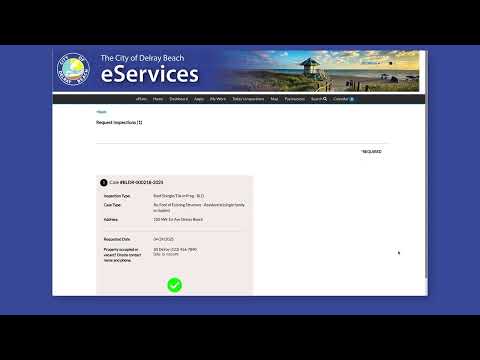
Staff explains how to schedule permit inspections and upload documents in online portal
Summary
A staff member described step-by-step how applicants can schedule inspections, choose dates and times, provide contact information, indicate site occupancy, submit or cancel inspections, and upload required documents through the online permit portal.
A staff member outlined how applicants should schedule and manage permit inspections through the online permit portal, including selecting inspection types, choosing dates and AM/PM times, entering contact information, indicating whether a site is vacant or occupied, submitting or canceling inspections, and uploading required documents.
The guidance matters because correct scheduling and timely document submission help ensure inspections proceed without administrative delays and that required materials are available for review.
According to the explanation, users open the permit record and select the inspection button…
Already have an account? Log in
Subscribe to keep reading
Unlock the rest of this article — and every article on Citizen Portal.
- Unlimited articles
- AI-powered breakdowns of topics, speakers, decisions, and budgets
- Instant alerts when your location has a new meeting
- Follow topics and more locations
- 1,000 AI Insights / month, plus AI Chat