Get AI Briefings, Transcripts & Alerts on Local & National Government Meetings — Forever.
Delray Beach staff demonstrate E-Services portal for permits, inspections and payments
Summary
A Delray Beach staff member demonstrated the city’s E-Services online portal, highlighting a dashboard, application tools, inspection listings, map search and invoice payment features designed to centralize permitting workflows.
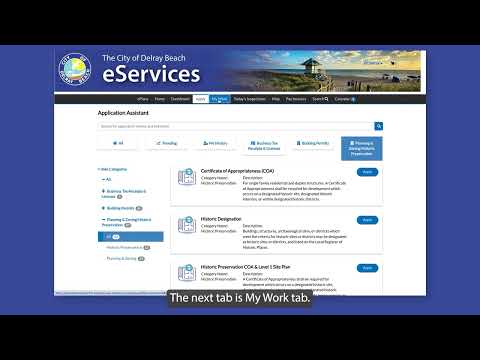
A Delray Beach staff member demonstrated the city’s E-Services online portal and said it "allows you to submit applications, track their progress, and receive important notifications throughout the process." The demonstration described the portal’s dashboard and several navigation tabs for permit-related tasks.
The demonstration explained why the portal matters: it centralizes permits, plans, inspections, invoices and licenses in one account and provides searchable public records tied to addresses. "After logging into the system, the first screen will be your dashboard. Here you will find my permits, my plans, inspections, invoices, and my licenses," the staff member said.
Staff walked through the portal’s main features. The Apply tab is where users start an application; a search bar at the top can be used to find application names or keywords; and a category dropdown sorts applications "by division," the staff member said. The My Work tab shows current permits, invoices and inspections and lets users click an item number in the first column to view more information. The Today's Inspections tab lists inspections in Delray Beach and can be searched by case number, inspection type or address or filtered by date.
The Map tab lets users search an address and find records associated with that address. For payments, the Pay Invoices tab accepts invoice numbers including prefixes or suffixes to find invoices. The Search tab provides a public-records search by address or keyword across the portal.
The staff member’s remarks were instructional in tone; no formal decisions, votes or policy changes were announced during the demonstration. The presentation focused on how to navigate existing portal features rather than proposing changes or new programs.
City residents and contractors seeking permits or inspection information were advised to log in to the E-Services portal to access their dashboard and the tabs described in the demonstration.