Get Full Government Meeting Transcripts, Videos, & Alerts Forever!
Get email alerts on the Business Tax Receipt Application topic
No spam. Unsubscribe anytime.
How to apply for a Delray Beach business tax receipt online
Summary
The City of Delray Beachtutorial explains how to use the e-services portal to start, track and submit a business tax receipt application, including selecting a NAICS code, adding owners, attaching documents and signing electronically.
The City of Delray Beach's e-services system lets applicants begin, track and submit business tax receipt applications online, the tutorial shown in the city's instructional video explains.
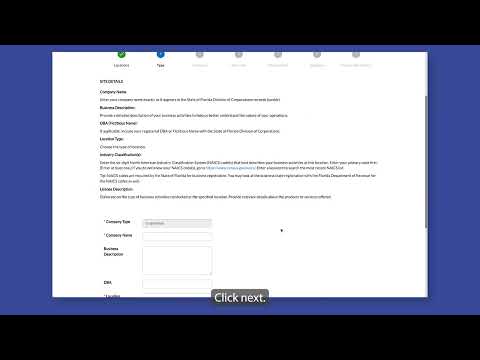
The online application process begins on the e-services portal's Applications page, where users click the Apply tab, choose the appropriate application category and follow an on-screen timeline that guides them through adding a business location, selecting an industry code, listing owners, attaching required documents and signing the form electronically. The tutorial notes applicants can search for and favorite contacts and that an FEIN may be left blank; applicants are advised not to enter a Social Security number.
Why this matters: using the online portal centralizes submission and notifications and reduces in-person steps for businesses seeking a local tax receipt. The tutorial highlights one specific accuracy point: the system requires a six-digit North American Industry Classification System (NAICS) code to describe primary business activities at the location, and users who do not know the code are directed to census.gov for assistance.
The video walks applicants through the sequence: select a company type and click the plus button, add the business location by checking the box and clicking Add, and follow the timeline to fill required fields including the NAICS code. If applicants do not know their NAICS code, the tutorial directs them to the U.S. Census Bureau website or to search within the portal by code or category selection. After selecting owners (users can mark a contact as a favorite by clicking the star), applicants upload required attachments, then enter a name to sign electronically or draw a signature with a mouse; the video shows a toggle to type in the name instead of drawing.
The tutorial concludes by instructing applicants to review the form and click Submit; the example confirmation shown states, "Your application was successfully submitted." The video does not specify processing timelines, fees, or follow-up steps beyond portal notifications, nor does it identify a contact person for help.
Practical details extracted from the tutorial: the NAICS code is a six-digit code; an FEIN may be left blank; applicants should not enter a Social Security number; the portal includes in-form help such as a searchable NAICS selector and a timeline indicator that tracks progress through the application.
For NAICS lookup, the tutorial points users to census.gov. The video is presented as an online walkthrough of the City of Delray Beach e-services portal rather than as a live meeting discussion or formal City Commission action.