Get Full Government Meeting Transcripts, Videos, & Alerts Forever!
Get email alerts on the Digital Services topic
No spam. Unsubscribe anytime.
Temple Terrace app lets residents report city problems from their phones
Summary
City of Temple Terrace staff outlined how residents can register for the Temple Terrace mobile app, submit service requests with photos and map pins, hide their username if desired, and check request status on the app.
City of Temple Terrace staff provided a step-by-step guide to using the Temple Terrace mobile app to register, submit service requests, attach photos and pinpoint locations on a map, and check the status of those requests.
The tutorial matters because it shows how residents can directly send problem reports to city departments and monitor progress without calling or visiting city offices. The presenter said the app routes requests to the proper department for review.
To begin, users should open the Temple Terrace app and, if it is their first time, sign up for a new account by tapping the notices button and entering their information and a password. After registering, users can use the home screen menu at the bottom of the app — notices, new requests, requests and profile — to start and track reports.
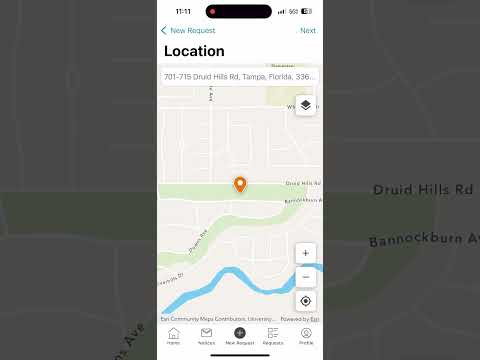
When creating a new request, users can attach evidence in four ways: camera, most recent (camera roll), photo library or no photo. The presenter encouraged residents to take clear photos so the receiving department can better understand the problem. After adding a photo, the app prompts the user to place a pin on the map to show the exact location and to select the category that best describes the issue. Users then type a description of the problem; an option lets them hide their username from public view.
"It's that easy. Your request will be reviewed and sent to the proper department so that it can be fixed," the staff member said. Residents can view their submissions in the profile area and check request status by tapping the requests button.
The presenter closed the tutorial by thanking viewers and encouraging them to use the app: "Thank you for being a Temple Terrace resident, and have an amazing day."