Get Full Government Meeting Transcripts, Videos, & Alerts Forever!
Get email alerts on the Municipal Website topic
No spam. Unsubscribe anytime.
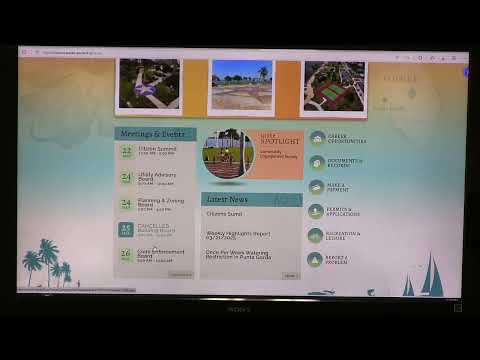
Punta Gorda staff walk residents through city website, outline video, records and notification limitations
Summary
Punta Gorda City IT staff led a public walkthrough of the municipal website to show features for payments, public records, meeting videos, accessibility tools and reporting problems; staff flagged delays in posting meeting video to the official archive and recommended clearer geotargeted emergency notices.
Alicia Oates, an IT department staff member for Punta Gorda City, led a public walkthrough of the city’s website and described tools residents can use to access documents, pay bills, view meeting videos and receive emergency notices.
Oates said the site includes an ADA accessibility menu to enlarge fonts and change colors, a critical-alerts banner that the city toggles for storms and boil-water notices, a link to an e‑procurement portal for bids, and a “report a problem” form that routes issues to the webmaster and appropriate departments. She also explained the city’s public-records workflow and a separate meetings‑management system used to index video to agenda items.
The presentation aimed to show where commonly requested information lives and to gather feedback on navigation and missing links. “Our goal is to make this website more user friendly,” Oates said, describing recent changes to highlight engagement surveys and emergency pages. She also asked residents for suggestions about moving frequently consulted documents — such as emergency plans and the comprehensive plan — into easier-to-find locations.
Why it matters: Residents rely on the website for time-sensitive information (payments, emergency notices, meeting recordings) and for public records. Oates and audience members raised limits and workarounds that affect access: video uploads can be delayed, some public records remain behind a portal for redaction review, and some searchable documents lack clear revision timestamps.
Most important details
• Meeting video and indexing: The city uses a meetings-management tool (Granicus) to link agenda items to video time stamps; when that automated connection fails because of variable meeting locations and a separate encoder device, staff upload a backup YouTube stream and then manually import and time‑stamp the file into Granicus. Oates said the download/upload and any edits “take multiple hours” and that preparing a final, indexed video can take a day or more; the result is that videos linked on the city’s official archive sometimes appear several days after the live event.
• In-room recording limits: The city clerk’s intern (identified as Alex) is recording the session; staff noted the camera can record about 30 minutes before restarting is required and that the person operating the camera uses a red card to signal presenters to pause while the device restarts.
• Public records and redactions: Oates described a new public‑records tool in migration. Departments may choose to make nonsensitive records directly viewable on a public portal; for records requiring review or redaction, residents must file a request through the portal so staff can check and remove sensitive information before release.
• Payments and utility rules: The site’s primary payment link goes to utility billing. Oates reiterated an administrative rule the billing office enforces: utility accounts remain in the property owner’s name even when a tenant occupies the property; the city can change a mailing address and add bank-draft information only with owner authorization.
• Forms, permits and contractor registration: The website hosts fillable permit PDFs and contractor-registration records. Oates said online permitting is tightly controlled and currently accepts only a few permit types; staff are reviewing whether to expand or replace software because some online tools do not collect the specific questions departments need.
• Finance documents and metadata: Budget and long-range financial documents are posted on the finance page, but audience members asked for clearer approval or revision timestamps. Oates said the budget page is updated and maintained in the regular cycle and she will pass along the suggestion to add revision metadata or approval time stamps.
• Canal maintenance and lot‑mowing map: The public-facing canal-maintenance page provides FAQs, maps and an interactive lot-mowing map. Oates demonstrated the map’s color coding: properties in the city mowing program appear green; lots that have opted out appear red.
• Notifications and geographic targeting: Residents raised inconsistent perceptions of notices (for example, confusion whether a boil-water notice came from Punta Gorda or Charlotte County). Audience members suggested wider use of the city’s text/phone alert system (referred to in the meeting as Alert Honeywell or similar services). Oates said the city can send targeted notices by street or neighborhood and encouraged registration for text alerts while noting that not all residents register for the service.
Discussion, directions and next steps
Audience members suggested a clearer “plans” hub linking the comprehensive plan, hazard mitigation and other planning documents; adding approval or revision timestamps to budget files; and improving the speed or continuity of meeting-video processing. Oates said staff will consider navigation and content changes and that residents should expect ongoing updates to the site. “Expect some changes on the city website,” she said.
Ending
The session combined a demonstration of live features with practical feedback from residents about discoverability, timeliness and geographic targeting. Staff noted technical constraints — chiefly the meetings encoder and manual time‑stamping process — that drive delays and said they will continue to refine navigation, metadata and alerting options based on public input.