Get Full Government Meeting Transcripts, Videos, & Alerts Forever!
CalVCB walks advocates through portal features, account setup and limits; staff pledge further fixes
Summary
The California Victim Compensation Board demonstrated the advocate portal’s search, assignment and upload functions at a webinar, answered questions about account setup and admin controls, and said it will review advocate feedback on correspondence access, draft handling and other usability issues.
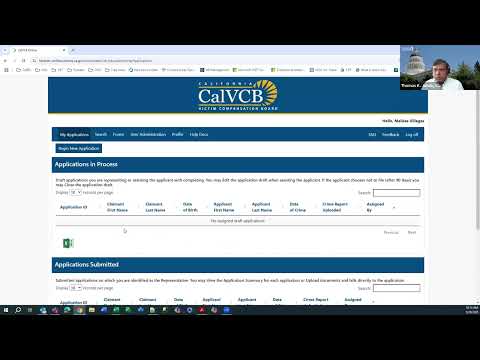
The California Victim Compensation Board demonstrated its renewed advocate portal and addressed advocate questions about account setup, search and assignment, document uploads and access to correspondence during a webinar session of agency staff and about 300 registered attendees.
Jennifer Rocco, deputy executive officer who oversees the victim compensation division at the California Victim Compensation Board, opened the webinar and said, "The entire team is very excited to engage with such a large group of advocates who are working to assist victims of crime." The presentation included a product walkthrough by Thomas Jacob of CalVCB’s IT division and a deeper-feature demonstration by Rachel Olsen, a CalVCB staff member.
CalVCB staff outlined how advocates get access and how the portal organizes work. Advocates request access by emailing the board with a short list of information; CalVCB then provides an advocate PIN and account setup directions. Once logged in, the portal’s My Applications page lists "applications in process" (including drafts with temporary IDs) and submitted applications that are assigned to the logged-in advocate. The portal includes a search function (by application ID, applicant name, date of birth or advocate office), a forms page, upload functionality for bills and supporting documents, and an office-level user administration page for advocate administrators.
The board explained assignment workflows and limits. Advocate administrators (office admins) are the only users…
Already have an account? Log in
Subscribe to keep reading
Unlock the rest of this article — and every article on Citizen Portal.
- Unlimited articles
- AI-powered breakdowns of topics, speakers, decisions, and budgets
- Instant alerts when your location has a new meeting
- Follow topics and more locations
- 1,000 AI Insights / month, plus AI Chat