Get Full Government Meeting Transcripts, Videos, & Alerts Forever!
Get email alerts on the College And Career Readiness topic
No spam. Unsubscribe anytime.
CHSD 128 staff demo SchoolLinks, a single platform for college and career planning
Summary
Ben Rodriguez, District 128’s director of college and career readiness, walked parents through SchoolLinks in a live webinar, showing login steps, the career center, postsecondary search tools, curriculum guides and how students were onboarded by grade.
Ben Rodriguez, director of college and career readiness at Community High School District 128, demonstrated the district’s new SchoolLinks platform during a live webinar for parents and guardians. Rodriguez showed how families can log into SchoolLinks, use the career center and postsecondary search tools, review district curriculum guides, and access resources the district has consolidated into the new system.
Rodriguez said SchoolLinks is intended to centralize planning tools for students. "School Links is our 1 stop shop platform for college and career readiness efforts," he said, describing the system as a replacement for the district’s prior tools, Naviance and SCORE.
SchoolLinks brings together four main functional areas used by District 128 students: a career center for exploring occupations and local opportunities; a postsecondary search that includes colleges, trade and certificate programs; interactive curriculum guides for Libertyville and Vernon Hills High Schools; and administrative features the district uses to run internships and produce reports. Rodriguez said SchoolLinks can display regional labor-market data, salary ranges, education requirements and videos or Q&A from professionals for individual careers.
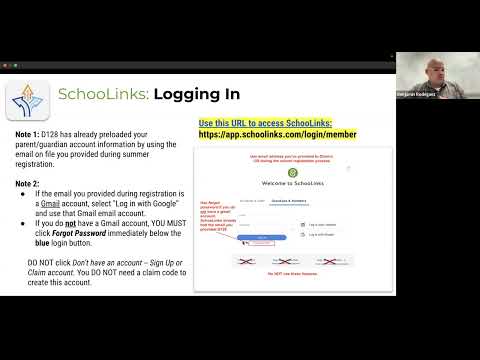
On login and account access, Rodriguez explained parents should use the email they provided District 128 during school registration or log in with Google if that address is a Gmail account. If parents cannot sign in, he advised using the platform’s "forgot password" option; he also said the district did not use account codes for parent/guardian accounts and noted that the guardian view defaults to the student’s school profile when signed in.
In the career center demo Rodriguez opened a software-development profile to show typical content: job growth indicators, salary ranges, education and training summaries, videos, a career comparison chart and a career Q&A feature where students can submit questions to SchoolLinks Professionals. He showed filters for degree level, growth rates and career clusters, and that students can favorite careers and create lists.
Rodriguez then demonstrated the SchoolLinks postsecondary search. He showed filters for location, degree type (four-year, two-year, certificate), public/private status, acceptance-rate ranges, athletics, campus size and admissions indicators (GPA and test scores). He opened a sample page for the University of Illinois at Urbana–Champaign to illustrate the one-page snapshots that include acceptance rate, graduation rate, enrollment, campus setting, student life resources, financial aid links and scattergrams that compare applicants’ GPAs and test scores with prior applicants.
Rodriguez cautioned that SchoolLinks imports data from third-party vendors and that families should verify important details on an institution’s official site if they see discrepancies. He also said the district uses SchoolLinks to manage its internship program and to pull reports for counselors and staff.
On curriculum guides, Rodriguez said the guides for Libertyville and Vernon Hills High Schools now live in SchoolLinks and that when students log in the system defaults to the student’s enrolled school. He described a streamlined overview section that distills front-matter from prior guides, a shared set of graduation requirements for both schools, and a set of seven career-pathway one-pagers (some marked with an asterisk to indicate state endorsement or a seal). Course offerings are searchable and tag-filterable (examples: Advanced Placement, dual credit). He demonstrated departmental views, course descriptions and the platform’s search and map tools for finding nearby schools.
Rodriguez summarized how students were onboarded: ninth graders through freshman transition and Link Crew activities this past fall; 10th graders during a Daring Day career-exploration event; 11th graders via an asynchronous outreach with a planned spring class meeting; and 12th graders through class meetings last year and as seniors. He said activities assigned by grade reflected the district’s "Daring Journey" progression of career, postsecondary and financial-planning experiences.
In the webinar Q&A, Rodriguez confirmed that all students have had some form of introduction to SchoolLinks and reiterated that district and building career-and-college resource staff can assist families with the platform. He said the presentation would be recorded and distributed and that the district has two written documents available for families: a general introduction letter and a parent/guardian account-creation letter. Rodriguez provided no specific email address in the webinar transcript for follow-up but named Cassandra Vasquez as a community partner administrative assistant who can also be contacted.
The webinar centered on demonstration and orientation; no formal actions, votes, or adoption motions were recorded during the session.