How to pay an invoice for California residential water treatment device registration
Get AI-powered insights, summaries, and transcripts
Subscribe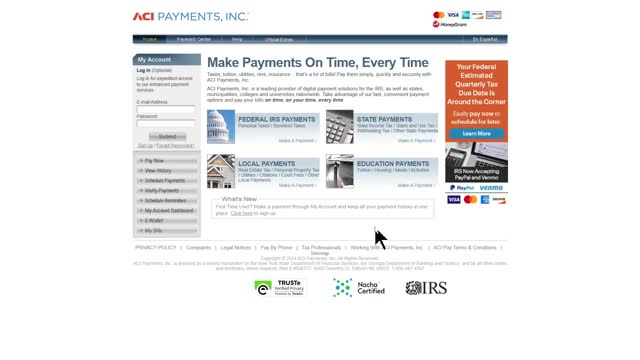
Summary
Applicants whose device registration applications are accepted through the RWTD portal can pay the invoice online by credit card or bank withdrawal, or by mailing a check. The State Water Resources Control Board warns a convenience fee applies to credit-card payments and provides an invoice format and contact email for questions.
Applicants who receive an invoice after their residential water treatment device application is accepted through the RWTD portal can pay online by credit card or by bank withdrawal (ACH), or mail a check, a State Water Resources Control Board program presenter explained in an instructional video.
The video summarizes why the steps matter and how to complete payment: follow the invoice email’s links and instructions, enter the SWRCB invoice number and the amount due exactly as shown, and retain the payment confirmation number for records and potential follow-up.
To pay by credit card, the presenter instructs users to open the state payments website linked in the invoice email, click “State Payments,” select “California” in the first dropdown and “State Water Resources Control Board” in the second, then choose “application fees” in the third dropdown and click “Make a Payment.” The presenter notes that the payments site displays a convenience fee on the next page and says, “The residential water treatment device registration program and the State Water Resources Control Board do not receive any part of this convenience fee.” At the bottom of that page, select “water device application,” click Search, enter the invoice number (which the presenter says begins with the letters varwtdinv followed by five numbers) in the SWRCB application field, enter the amount due, and click Select. Users may add additional payments if needed, then click View Cart, review entries, continue to the payment form, and submit. The presenter advises making note of the confirmation number that appears after payment is submitted.
To pay by bank withdrawal (ACH), the video shows similar steps using the bank withdrawal payment site linked in the invoice email: click the application fees button, enter the provided invoice number into the SWRCB application number field and the invoice amount into the invoice amount field, add rows for additional payments if needed, and click Continue. The presenter again directs users to record the confirmation number when the payment completes.
If paying by check, the presenter says instructions for mailing a check are included in the invoice email. For any questions about making a payment, the presenter gives the contact email wtdevices@waterboards.ca.gov and repeats that the invoice email contains the invoice number and the amount due.
The presenter emphasizes retaining the invoice email and the payment confirmation number in case either is needed later; the video does not provide examples of typical fee amounts or a schedule of convenience fees charged by the payment processor.