Get Full Government Meeting Transcripts, Videos, & Alerts Forever!
Get email alerts on the Research Texas Case Notices topic
No spam. Unsubscribe anytime.
Research Texas to begin automatic case notices to attorneys Oct. 1
Summary
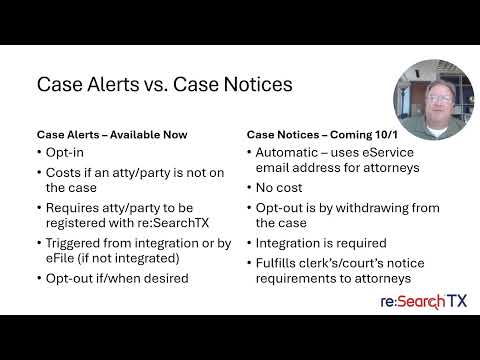
The Texas Office of Court Administration will enable automatic, free case notices through Research Texas on Oct. 1. Notices will be sent to attorneys of record via the State Bar e-service email when integrated county clerks docket events; about 250 of 443 clerks are currently integrated.
Casey Kennedy, director of information technology at the Texas Office of Court Administration and lead staff for the Judicial Committee on Information Technology, said in a recorded presentation that Research Texas will begin sending automatic case notices to attorneys of record on Oct. 1.
The notices will be sent at no charge to the attorney and will use the attorney’s State Bar electronic service email tied to the attorney’s bar number in the clerk’s case management system, Kennedy said. “These case notices do fulfill the clerk's and court's requirements to notify attorneys for case notices,” he said.
Research Texas is the statewide electronic document access system for court documents (research.txcourts.gov). Kennedy said most counties are integrated so that when a local clerk dockets an event in the county’s case management system, Research Texas receives that update and will issue a notice, usually within about 30 minutes. “We have roughly 250 of the 443 clerks integrated,” he said, and “approximately 98% of the clerks in counties, with a population greater than 60,000 are integrated today.”
How case notices differ from existing case alerts
Kennedy explained that case alerts available today are opt-in: attorneys or other users must register in Research Texas and sign up for alerts on specific cases. By contrast, the new case notices will be automatic and sent to attorneys of record without requiring a Research Texas registration. Kennedy said case alerts are free for attorneys and parties on the case but may involve a small vendor charge if someone not on the case signs up for alerts.
Under the new system, the clerk’s integration and the attorney-of-record linkage are the triggers. Kennedy described the delivery process: the county clerk dockets an item, the local case management system updates Research Texas (generally within about 30 minutes), and Research Texas sends the notice to active attorneys on the case using the State Bar e-service address associated with the attorney’s bar number.
What attorneys and firms should know
Kennedy recommended that attorneys verify their State Bar e-service address and consider using a distribution list so paralegals or other firm members can receive notices. He warned that attorneys who remain listed as attorney of record on old cases may receive notices for those matters and suggested withdrawing from cases where the attorney no longer represents the party if they wish to stop notices. He also recommended that recipients add no-reply@researchtx.com to their allow list; “these will come from no-reply@researchtx.com,” he said.
Viewing documents and support
Registration on Research Texas is not required to receive notices, Kennedy said; the system will use the bar number to locate the attorney’s service email. If a recipient clicks a link to view a document and has not registered, the link will route them to a registration page before showing the document. Kennedy provided a vendor support address for technical questions: research.support@tylertech.com.
Timing and rollout
Kennedy said the October 1 activation applies to clerk offices that are integrated with Research Texas and that additional clerk offices are expected to come online through November. He noted that clerks in larger counties are already largely integrated and that the automatic notices will be used to satisfy clerk and court notification duties to attorneys.
No formal vote or policy change was recorded in the presentation; Kennedy framed the session as a technical rollout and explained practical steps attorneys can take to receive or manage notices.