Get Full Government Meeting Transcripts, Videos, & Alerts Forever!
Get email alerts on the Pension Reporting topic
No spam. Unsubscribe anytime.
TRS presenter details Employer Access rules for supplementary reports and sick‑leave certifications
Summary
A Teachers' Retirement System (TRS) presenter reviewed how school districts must submit supplementary reports and sick‑leave certifications through Employer Access, clarifying required fields, how lump‑sum payments are treated, employment‑type definitions, and steps to avoid delays in member benefit payments.
A staff member from the Teachers' Retirement System (TRS) walked district payroll and benefits staff through how to submit supplementary reports and sick‑leave certifications through TRS’s Employer Access portal, stressing that correct and timely submission speeds member benefit payments.
The presentation clarified why supplementary reports are required when a member requests a benefit (retirement, single‑sum, disability, death, or refund): the district’s submission allows TRS to process and pay the benefit quickly before the employer’s annual certification is submitted and audited. The presenter said the sick‑leave certification covers the four years before retirement and must be completed even if the member no longer works for the district during that period.
The guidance matters because errors or late submissions can delay pension payments by weeks or months. The presenter cautioned that TRS generally recommends submitting reports as soon as the member’s last paid day is known and said districts that wait risk back‑and‑forth questions that push payments into later months.
Among the specific instructions: supplementary reports and sick‑leave certifications are in Employer Access (not in Gemini). Districts receive an email (sent Wednesdays) only when somebody is added to their queue. On selection, an initial screen prompts for several fields; if a sick‑leave certification applies, a link to that form appears. The presenter walked through the screens and the required fields.
Key required dates and fields - Last day of school term or employment agreement (use the contract end date, not the last paycheck date). If the member worked summer school or has a longer administrator contract, use that contract end date. - Last paid day, inclusive of paid sick‑leave days: the calendar date the member last worked or used sick leave. The presenter emphasized this is the date that allows TRS to accept the supplementary report and begin processing. - Date of last payment for regular earnings (entered on the second screen): list the actual last paycheck date (for example, an August paycheck) to reflect how the member was paid.
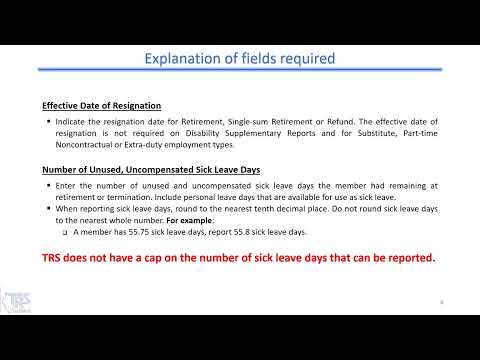
Sick‑leave totals and lump sums The presenter explained how to report unused, uncompensated sick‑leave days (including any personal days used as sick leave). TRS requires reporting to the tenth (for example, 55.75 days reported as 55.8). TRS does not cap reported sick‑leave days. Districts must decide whether to report days or lump‑sum payments, because TRS treats either the days or the payment as reportable but not both. The presenter summarized the rule: “either the days or the payment is reportable, never both, and never neither.”
Payroll and earnings fields Districts must enter the member’s base annual salary rate (including any board‑paid TRS contributions) and the credible earnings actually paid. The presenter warned that those totals for retirement and death supplementary reports will be required to match the annual certification and will trigger errors if they do not.
Employment types and how to report them The presenter defined TRS employment types used on reports: - Full time: working 4 or more clock hours per day Monday–Friday (report as full time even if the member worked only part of the year but the schedule meets that threshold). - Part time contractual: contract is for less than 4 hours per day or fewer than five days a week. - Substitute: temporary daily on‑call or long‑term substitute filling another teacher’s position. - Hourly: workers paid per hour or per case without a contract (examples: homebound instructors, some psychologists/social workers paid per case). - Extra duty: duties not requiring a license (coaching, extracurricular duties) reported separately even if the person is full time elsewhere.
Errors, edits and revisions After saving, the system flags errors (fatal errors in red must be corrected). Nonfatal edits require review and clicking the info icon to see requested supporting information. If a supplementary report requires revision, districts must use the revise tab, enter the member’s Social Security number to pull the claim, and provide a required comment explaining the change (for example, “late timesheet”). The presenter said saving and printing options are available and that previously submitted reports can be retrieved later from the reports section.
Special cases - Disability claims: submit the member’s information as it existed when disability leave began (for example, the pay and days that will cover the disability period). - Granted/bonus days: TRS applies an “available for use” formula and will not accept bonus days that cannot actually be used before termination; improper reporting of granted days can lead to TRS removing days on audit and can force a member to work into the next fiscal year to qualify for retirement.
The presenter closed with links to the Employer Access tutorial and to TRS resources (chapter references for service credit and excess cost) and noted TRS’s online calculators for estimating excess cost and employer 9% contributions. The presenter repeated that accurate, complete entries and timely submission reduce questions and help members receive benefits sooner.