Get Full Government Meeting Transcripts, Videos, & Alerts Forever!
Get email alerts on the Pension Administration topic
No spam. Unsubscribe anytime.
TRS walks districts through supplementary reports and sick‑leave certifications to avoid pension delays
Summary
A Teachers' Retirement System staff member reviewed how school employers should complete supplementary reports and sick‑leave certifications in Employer Access, emphasizing correct dates, how to report sick days or lump‑sum payments, employment‑type categories, and the need to submit reports on the last paid day to avoid delayed benefit payments.
A TRS staff member explained how school districts should complete supplementary reports and sick‑leave certifications in Employer Access to ensure timely processing of retirement, disability, death and refund claims.
The presentation described what a supplementary report is, how the sick‑leave certification operates for the four years before a retirement, and why accurate, timely entries in the Employer Access portal matter for members’ benefit payments and audits.
The staff member said a supplementary report allows a benefit to be processed and paid before the employer’s annual certification is submitted and audited by TRS. Employers receive a weekly email (sent on Wednesdays) only when someone is added to their queue. The Employer Access queue shows the member, the kind of report required (supplementary or sick‑leave certification) and an estimated claim date; once the district submits the requested information, the member disappears from the queue.
The presenter emphasized three separate dates that employers must enter correctly: the last day of the school term or employment agreement (usually the contract end date), the last paid day inclusive of paid sick leave (the calendar date the member last used sick leave), and the date of last payment for regular earnings (the actual paycheck date). The last paid day is the field that allows submission of the supplementary report; TRS advised submitting the report on that last paid day so benefits can be paid as soon as possible. The presenter warned that delays in submission or back‑and‑forth questions can push benefit payments by weeks or months.
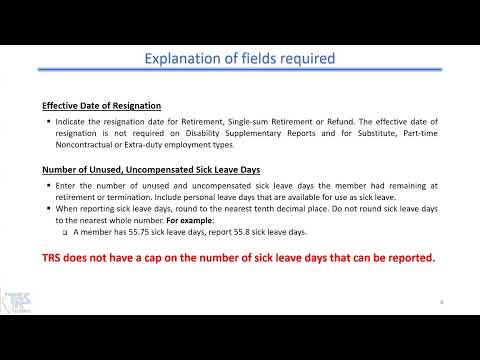
On sick‑leave reporting, districts must list unused, uncompensated sick leave days (including personal days if they count as sick leave). TRS requires reporting to the tenth (for example, 55.75 rounds to 55.8) and stated there is no cap on the number of sick‑leave days reported to TRS. The presenter gave a clear rule on lump‑sum payments and days: either the days or the payment is reportable, never both, and never neither. For example, if an employer pays a lump sum for 50 of 300 sick days after the member’s final paycheck and that lump sum is not reportable to TRS, the full 300 days remain reportable; if the employer pays the lump sum as part of the last paycheck or while the employee is still working, employers must report the compensated days and the earnings.
The presentation covered the 6% issue and retirement incentives: employers should be careful when offering incentives or board‑paid contributions that might push reported credible earnings above typical amounts; TRS provides a calculator on its website to estimate excess‑cost and 6% costs.
Employer guidance also included definitions and examples of employment types reported to TRS: full time (working four or more hours per day Monday through Friday), part time contractual (less than four hours per day or fewer than five days per week), substitute (temporary daily on‑call or long‑term substitute filling another teacher’s position), hourly (no contract, paid per case or hour), and extra duty (duties that do not require a license, such as coaching). The presenter noted some districts mistakenly classify employees based on months worked rather than contract schedule and reminded employers that if the contract requires Monday–Friday at least four hours daily, that position is full time even if the employee begins midyear.
On the Employer Access workflow: after the initial screen is saved the system checks for errors. Fatal errors are highlighted in red and must be corrected before proceeding; nonfatal edits require review and may include TRS comments with instructions. Employers can revise submitted supplementary reports by looking up the member and must include a comment explaining the revision (for example, “late time sheet” or “forgot board‑paid contributions”). Employers can print blank forms or submitted reports from the reports section.
The presenter described sick‑leave certification columns: column 1 is the normal annual allotment the employee was entitled to under the contract; column 2 is what the district actually added to the account (bonus/granted days show up in column 2). TRS reiterated it will not accept granted/bonus days that cannot be “available for use” by the employee before termination; if bonus days are added in error and later removed during an audit, a member’s retirement timing may be affected.
Disability supplementary reports require reporting the member’s information as of the day they began disability leave and often ask for projected earnings for the remainder of the period covered by sick leave (for example, the daily rate over the remaining calendar days). The presenter said these reports are more detailed and more commonly occur in midyear.
The session closed with links and references: TRS’s Employer Access tutorial, chapter 3 (examples of extra duties), chapter 6 (service credit and the available‑for‑use formula), chapter 8 (excess cost), and online calculators for bonus‑day cost and the 6% calculation. The presenter urged employers to provide detailed comments on submissions to speed processing and avoid repeated follow‑up.
“a day is a day is a day,” the presenter said, illustrating TRS’s guidance to count every calendar day an employee worked or was paid as a day for reporting purposes.
Resources and contact directions were referenced on TRS’s website for tutorials and cost calculators; employers with complex contracts or questions were advised to contact TRS for clarification.