Get Full Government Meeting Transcripts, Videos, & Alerts Forever!
Get email alerts on the Digital Permitting topic
No spam. Unsubscribe anytime.
Laguna Beach introduces online permitting portal; city sets 2–3 day screening goal
Summary
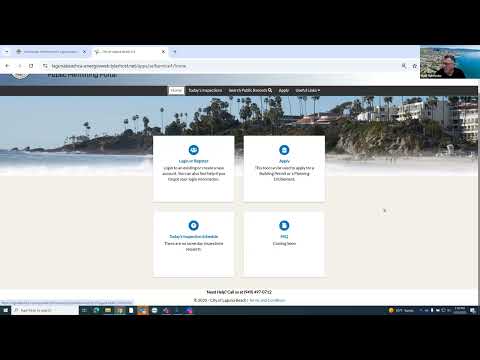
Laguna Beach’s Community Development Department on Tuesday introduced a new online permitting portal built on the EnerGov platform and said the system will be offered in addition to in-person counter services.
Laguna Beach’s Community Development Department on Tuesday introduced a new online permitting portal built on the EnerGov platform and said the system will be offered in addition to in-person counter services.
Assistant Director of Community Development Matt Schneider led the webinar and said the portal will let applicants submit zoning plan checks and building permits 24 hours a day and track reviews online. “Our expectation right now is that your submittal will be reviewed within 2 to 3 business days,” Schneider said. He also said the department’s goal is that, after online payment, a planner or plan checker will be assigned within five business days.
The city emphasized the portal is additive, not a replacement. Schneider said applicants should continue to bring two hard sets of approved plans to City Hall for job-card issuance during the initial rollout. “At least initially, as we start, we want to continue to have 2 hard sets available — one for the field and one for our walls here in the city,” he said.
Why it matters
City staff said the portal is intended to reduce paper handling and speed routine steps by allowing digital uploads, online payments and immediate access to reviewer comments. For frequent applicants and design firms, the portal aims to make it easier to see who is holding up a review and to exchange revised plans without printing multiple hard copies during iterative reviews.
What the portal will do and how it will work
Schneider walked attendees through common workflows: register; choose permit or plan check (ADU, commercial, residential); enter project address; add the applicant and required property-owner contact; upload PDF application and plans; sign digitally; and submit. The portal accepts PDF uploads only and will flag required fields with a red asterisk.
After the initial screening the city will email an invoice; applicants can pay online or bring the invoice to the counter and pay by check or card. “As soon as that is paid, it gets assigned to the planner who’s going to be working on your project,” Schneider said.
City staff named three in‑house plan checkers who will review submissions: Ray, Faye and Jonathan. Schneider said the system will display which reviewer has been assigned and that reviewer contact information is available on the city website.
Notable limitations and early rollout decisions
- Additive rollout: The city will accept both counter submittals and online submittals. For projects that were already processed at the counter, staff said they expect to marry those records into EnerGov over time but will prioritize new projects for the portal during initial launch.
- Two hard sets initially: Approved sets will still require two printed copies at issuance until the city shifts to fully digital permits.
- File format: Uploaded plans and forms must be PDFs and not password-protected. Some application forms that are not yet fillable PDFs are being updated.
Questions and concerns raised by stakeholders
Multiple attendees raised operational questions during the Q&A. Ryan (an applicant/designer on the call) asked, "Can the owner jump back in on their own and pay?" Schneider replied that the invoice initially goes to the applicant who submitted the project but the applicant can pass the invoice link to the owner; owners can also register for EnerGov and will be linked to projects tied to their email address.
Anders Laster, representing an architecture firm, asked about duplicate or split accounts and requested help merging multiple firm accounts so all projects appear under one company account. Schneider said the city will work with firms to merge accounts but asked for a short window after launch to stabilize operations.
Diane, who identified herself as representing Logan and Construction, asked whether the city will reconcile legacy records that appear in the system with older status flags (for example, records that list a project as “in process” though it is finaled). Schneider said staff will reconcile records but that the backlog spans many years and will take time; he advised users to use portal filters by date to narrow results.
Diane also suggested replacing repeated PDF uploads for simple acknowledgments (yes/no questions, role selections) with in‑form checkboxes. Schneider said the city will review that suggestion and examine examples from other cities.
Technical and notification details
- Default notification: Department training has defaulted notifications to the applicant contact only. Other contacts, including owners or additional professionals, will not receive automated back-and-forth notices unless the owner registers or the applicant shares access.
- Resubmittals: Applicants can resubmit revised plans and attachments through the portal; the system records acknowledgements and re-enters files into the reviewer queue.
- Bluebeam integration: Reviewers will mark up plans in Bluebeam; comments are available in the portal as they are posted so applicants do not need to wait for all reviewers to finish before seeing individual comments.
Next steps and follow-up
Schneider said the city will publish FAQs and the recorded webinar, and invited attendees to a follow-up session at the end of the month to review early experiences and collect feedback. He asked firms to try the system and report glitches so the city can refine workflows and permissions.
Stakeholder quotes
- "This is in addition to our current processes," Schneider said, stressing that applicants may continue to use counter services.
- Ryan asked, "Can the owner jump back in on their own and pay?" Schneider explained the invoice and payment flows and noted that owners can register for EnerGov to access projects tied to their email.
- "When I did set up our company account, I did see that there were multiple options," Anders Laster said, asking for help merging accounts so projects appear in one place.
- "It'll be easier if the interface is just a click on the screen rather than submitting a form," Diane of Logan and Construction suggested about common acknowledgments.
Ending
The city said the initial service-level expectation is a 2–3 business day screening for completeness and a target of assignment to a planner or plan checker within five business days after payment. Staff reiterated it will continue to accept paper submittals and appointments during the early rollout and will provide a follow-up webinar and posted FAQs for users.