Get Full Government Meeting Transcripts, Videos, & Alerts Forever!
How to use the GEARS portal to report you do not own a groundwater well
Summary
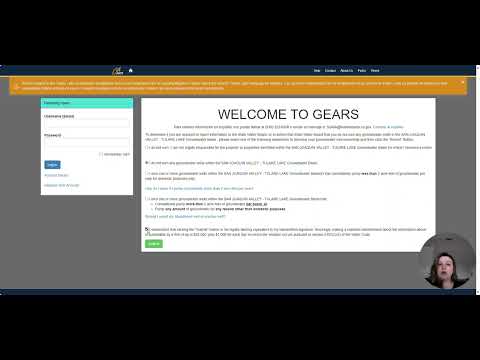
A presenter named Amanda walked listeners through the GEARS website steps to report that they do not own groundwater wells: enter the correspondence ID, select the option "I do not own any groundwater wells within the basin for which I'm being contacted," click 'I understand' and submit, then save the confirmation number.
Amanda, a staff member, walked listeners through step-by-step instructions for people who received a letter asking about well ownership but do not own wells on their property. She said recipients should go to the GEARS website referenced in the letter, enter their name and the correspondence ID shown in the top-right corner of the letter, and proceed through the portal screens.
Amanda directed users to click Next until they reach a…
Already have an account? Log in
Subscribe to keep reading
Unlock the rest of this article — and every article on Citizen Portal.
- Unlimited articles
- AI-powered breakdowns of topics, speakers, decisions, and budgets
- Instant alerts when your location has a new meeting
- Follow topics and more locations
- 1,000 AI Insights / month, plus AI Chat