Get Full Government Meeting Transcripts, Videos, & Alerts Forever!
Get email alerts on the Well Reporting topic
No spam. Unsubscribe anytime.
How to use the GEARS portal to report you do not own a groundwater well
Summary
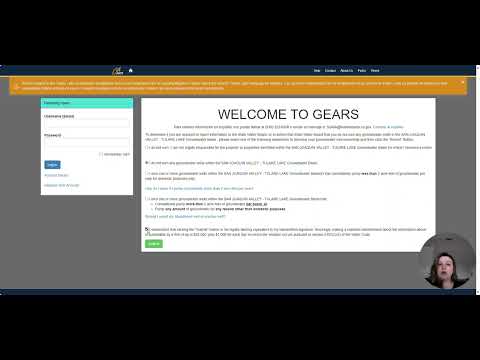
A presenter named Amanda walked listeners through the GEARS website steps to report that they do not own groundwater wells: enter the correspondence ID, select the option "I do not own any groundwater wells within the basin for which I'm being contacted," click 'I understand' and submit, then save the confirmation number.
Amanda, a staff member, walked listeners through step-by-step instructions for people who received a letter asking about well ownership but do not own wells on their property. She said recipients should go to the GEARS website referenced in the letter, enter their name and the correspondence ID shown in the top-right corner of the letter, and proceed through the portal screens.
Amanda directed users to click Next until they reach a screen showing their parcel and then select the second response option: "I do not own any groundwater wells within the basin for which I'm being contacted." "I do not own any groundwater wells within the basin for which I'm being contacted," she said, identifying the exact option to choose.
She explained who should use that response: those who never owned wells on the property, those who only have abandoned wells, and those with wells that have not been used or maintained for years and who have no intention of using them again. After choosing the option, users are to click the "I understand" button and then Submit; the portal will display a confirmation number to show the submission was received. "You're then going to see a confirmation number, which lets you know that it went through on our end," Amanda said.
If a user is unsure whether the submission completed, Amanda advised returning to the GEARS home screen, re-entering the name and correspondence ID, clicking Next, and verifying that the confirmation number appears. She said that submitting the form notifies the agency that the property has no wells and prevents further contact: "And this way, you're not going to get contacted again because it lets us know you do not have Wells." Amanda closed the guidance by saying, "Hope this helps."