Get Full Government Meeting Transcripts, Videos, & Alerts Forever!
Get email alerts on the School Communications topic
No spam. Unsubscribe anytime.
Promotional demo for Pittston Area School District mobile app
Summary
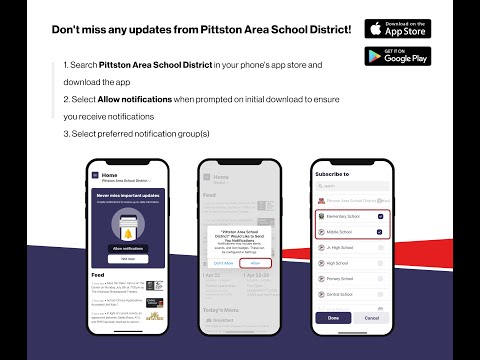
This transcript is a brief promotional demonstration for a Pittston Area School District mobile app describing the home screen, menu navigation, notifications, subscriptions, events, and app-store search; it contains no civic meeting content.
The recording is a short promotional walkthrough of a new Pittston Area School District mobile app. A speaker described the app’s home screen and navigation, instructing listeners to tap the three horizontal lines at the top left to open the menu and to use Settings → Notification Preferences to enable push notifications. The speaker said users can subscribe to their school via the Subscriptions menu and that the Events section lists school events with buttons to add items to a personal calendar or share events with others. The feed, the speaker said, contains updates from district administration, such as student achievements or reminders about deadlines. The speaker closed by directing listeners to search “Pittston Area School District” in the App Store or Google Play to download the app.