Get Full Government Meeting Transcripts, Videos, & Alerts Forever!
Get email alerts on the Home Visiting Dashboard topic
No spam. Unsubscribe anytime.
Tutorial outlines Tribal MCV outcomes dashboard for federally funded home‑visiting programs
Summary
A presenter walked viewers through the Tribal MCV outcomes dashboard, demonstrating navigation across three main tabs (program profile, program benchmarks, grant recipient profiles), how to filter by cohort or select a grant recipient on the map, and how to view 2024 implementation measures and hoverable detail panels.
A presenter provided a step‑by‑step tutorial of the Tribal MCV outcomes dashboard, which is intended to show data on federally funded maternal, infant and early childhood home‑visiting services.
The presenter said the dashboard’s top navigation includes three tabs: a Tribal MCV program profile, tribal MCV program benchmarks and grant recipient profiles. "To access this dashboard, select the go to dashboard icon from the left hand side of the screen," the presenter said, adding the landing page highlights results from the most recent 2024 data.
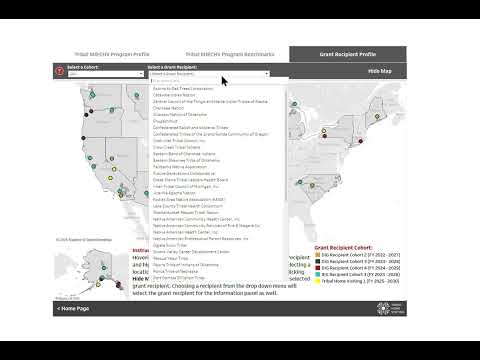
The grant recipient profile view allows users to select an individual grant recipient from a map or filter by cohort using a dropdown. The presenter described four primary panels that appear when a grant recipient is selected: grant recipient information, grant recipient goals, implementation context, and grant recipient location and key metrics.
On the Program Benchmarks tab the dashboard defaults to implementation measures; the presenter said each measure shows 2024 results and a time series, and includes a short description of what the measure denotes. The Program Profile tab breaks responses out by survey questions such as program reach, overall participant information and those newly enrolled.
The presenter demonstrated interactive features: arrow navigation, an expand icon that reveals additional content on hover, and a hover example for family engagement by household that shows a breakout of continuing versus newly enrolled participants. "If we're looking at family engagement by household, if I hover over the bar, I will see a breakout for continuing and newly enrolled by each of those statuses," the presenter said.
The tutorial closes with a reminder that a YouTube help video is linked on the main page and that the State MIECHV dashboard is available at the bottom of the screen. "This is a quick tutorial. Please enjoy exploring the dashboard," the presenter said.
The presentation is a navigation and features walkthrough; it does not report policy decisions, budget actions, or findings beyond the shape of the 2024 measures displayed on screen.