Spanish tutorial walks users through Gears reporting tool for groundwater extraction to the State Water Resources Control Board
Loading...
Summary
A Spanish-language walkthrough video demonstrates how to use Gearsto report groundwater extraction: enter the correspondence ID from the boards letter, verify parcels, choose one of four reporting options (including a 'minimis' threshold of more than 2 acre-feet per year), create an account if required, and receive a confirmation number.
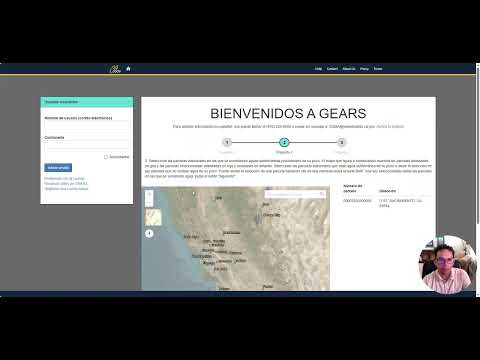
Presenter Nicols walks Spanish-speaking users through the Gears rapid-report assistant that helps groundwater extractors submit reports connected to correspondence from the State Water Resources Control Board.
"Paso 1, ingrese su informacin," Nicols says as he shows the first screen, instructing users to enter their name and the correspondence ID shown in the upper-right corner of the letter they received from the State Water Resources Control Board. He notes that users with multiple correspondence IDs can click the button to add additional IDs and then click "next."
The tutorial explains three verification steps: first, confirm the basin and parcel numbers shown on the verification screen; second, use the map tool to add or remove parcels (click a parcel to highlight or remove it), then click "send" to update the list; third, choose one of four reporting options shown on the screen. As Nicols lists them: (1) I do not own or am not legally responsible for the identified property; (2) I do not own a groundwater well inside the basin; (3) I am a "minimis" extractor pumping less than or equal to 2 acre-feet per year for domestic use; (4) I pump more than 2 acre-feet per year for non-domestic purposes or pump any amount for non-domestic uses. "Paso 3, elija su opcin para reportar," he says while showing the option list.
The presenter demonstrates the calculator feature users can open to estimate acreages and the percent of groundwater use for parcels, but he also notes users may declare themselves a "minimis" extractor even if the calculator gives a different result. The walkthrough explicitly states that the threshold discussed is 2 acre-feet per year when distinguishing domestic 'minimis' users from larger extractors.
If users select one of the first two options (not owner / no wells), the assistant ends and they will not be contacted again. Choosing the fourth option requires creating an account. Nicols goes through the account registration fields (correspondence ID, company name, username, password, first and last name, phone number) and shows that the system will send a confirmation email with a link the user must click to activate the account. He advises checking spam or junk folders if the confirmation email does not arrive and demonstrates the "account problems" link for resending confirmation.
For correspondence ID resets, the video shows a form to enter an email and the ID and select a reason from a dropdown; if automatic reset does not work, the presenter points to a help link that provides an email at the State Water Resources Control Board domain (waterboards.ca.gov) for unresolved issues. For users who select the third ("minimis") option, the video shows clicking the parcel containing the well on the map and then pressing "send," or using a "skip" button if they prefer not to share the exact well location with the board. The assistant then displays a confirmation number, which completes the rapid-report flow for that selection.
The video closes with a thank-you and a note that other videos cover additional Gears features.