Get Full Government Meeting Transcripts, Videos, & Alerts Forever!
Get email alerts on the Utility Billing Autopay topic
No spam. Unsubscribe anytime.
Staff member explains how to enroll in automatic utility payments for Burr Ridge
Summary
Village of Burr Ridge staff outlined step-by-step instructions for enrolling in automatic payments on the village's new utility billing platform, including where to find the 10-digit account number, how to create an account, and the requirement to make one manual payment before autopay can be enabled.
A staff member for the Village of Burr Ridge walked residents through enrolling in automatic payments on the village's new utility billing platform, explaining how to find an account number, create an account and enable autopay.
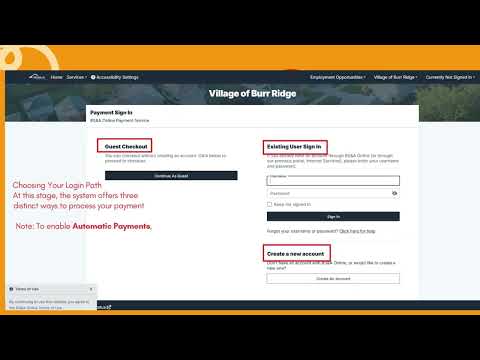
The staff member said listeners should "visit the village website and click on the online payments icon," then select "water and sewer bill" and choose "utility billing" under the "pick bill type" section. Users must locate their 10-digit account number, which appears on the paper statement in the top right corner and on the bottom return stub, the staff member said.
To complete payment, the staff member instructed users to click "review and pay" to confirm charges, then either "select pay in full" to pay the total or enter a specific amount and "click pay now." The presenter noted that guest checkout is not available for one-time payments: "you must be logged into a registered account to enable autopay." New users were told to "select the create an account option to enjoy full access to your billing history and automatic features."
On security, the staff member said the platform requires customers to "pay at least 1 bill manually through this platform before you can enroll in autopay." While making that first payment, customers should check the box for "enable automatic payments" under the utility billing record options and check "save payment method" before submitting payment.
For questions or help, the staff member provided a support email and phone number: utilitybilling@bur-ridge.gov or (630) 654-8181 ext. 4030. The presentation closed with thanks.
The village did not announce changes to billing policies or fees during the demo; the session focused on how to navigate the new online payment flow and how to activate automatic payments.