Get Full Government Meeting Transcripts, Videos, & Alerts Forever!
Get email alerts on the Voting Accessibility topic
No spam. Unsubscribe anytime.
EAC accessible voting machines calculator demo displays wait-time and equipment outputs
Summary
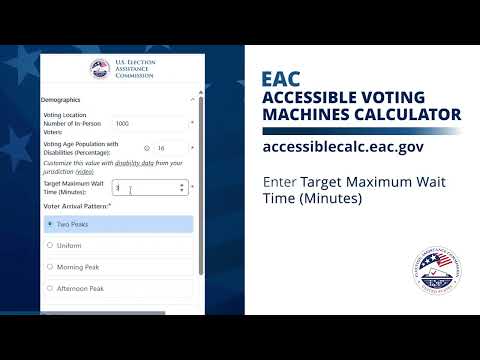
A presenter demonstrated the Election Assistance Commission's accessible voting machines calculator (accessiblecalc.eac.gov), entering sample inputs—1,000 in‑person voters, 16% voters with disabilities and a 30‑minute target wait—then ran a simulation that showed optimized results and accessible-machine wait-time data.
A presenter demonstrated the Election Assistance Commission (EAC) accessible voting machines calculator, showing the tool's interface and URL, accessiblecalc.eac.gov, and then entered a set of sample parameters before running a simulation.
The presenter entered 1,000 in-person voters, set the voting-age population with disabilities at 16 percent and set a target maximum wait time of 30 minutes. They selected a two-peak voter arrival pattern (morning and afternoon), chose electronic check-in equipment with four check-in stations, set non-accessible voting machines to 0 and accessible machines to 1, and added five hand-marked ballot stations. For ballot casting, the presenter selected an electronic ballot scanner and entered one ballot casting station.
After inputting those parameters, the presenter clicked the 'run simulation' control. The screen expanded to show full results: the presenter scrolled through sections labeled 'original results' and 'optimized results' and then viewed a dedicated accessible voting machine wait-time data section. The demonstration therefore showed both the inputs the calculator accepts and the visible outputs the tool generates for the configured scenario.
The demonstration did not include commentary on recommended staffing or policy decisions; it displayed the calculator's interface, the configured scenario parameters and the resulting data on wait times and optimized configurations. No formal findings, endorsements, or administrative actions were announced during the recorded demo.