Get Full Government Meeting Transcripts, Videos, & Alerts Forever!
Get email alerts on the Digital Government topic
No spam. Unsubscribe anytime.
Franklin Park rolls out resident portal for reporting and tracking neighborhood concerns
Summary
A Franklin Park borough staff member demonstrated a new online resident concern portal that requires user accounts, uses a PIN for report security, and lets residents submit and track single-issue reports; staff noted anonymous reports and file uploads are not available now.
A Franklin Park staff member introduced a new online resident concern portal designed to let residents report issues and check status 24/7.
The staff member said the portal emphasizes two-way communication and requires residents to create an account before a report will be processed. “Two-way communication is the key to successful local government,” the presenter said, adding that anonymous reports are not accepted: “If however you want to provide anonymous reports or concerns, this is not the tool for you.”
The demonstration covered account setup and navigation. Users are directed to the borough site and the resident concern tab or can scan a QR code; they must click sign-up, provide a valid email and password, verify contact details, accept terms and create the account. Contact information auto-populates from the account when filing a report.
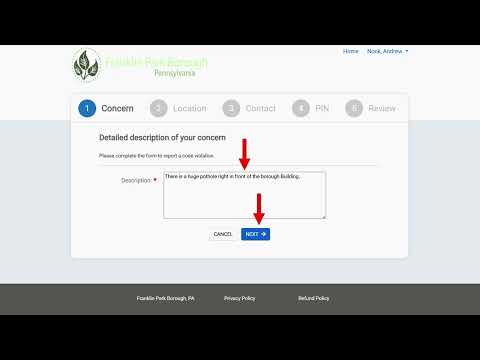
Staff walked through submitting a concern: write a single issue per report, expand the text window if needed, and note that image or document uploads are not supported at this time. For location, the form offers three options: give a general location/nearest intersection, type a house number and select from a pop-up address list when available, or manually fill known address fields if the correct address does not appear.
Security and follow-up procedures were emphasized. Each report is assigned a PIN and also generates a confirmation number that is emailed; the PIN plus account credentials are required to view the report’s status. The presenter described typical status flows—assigned, open (work in progress), and closed—and used public works and code enforcement as examples of assignment pathways.
On code enforcement, the staff member noted that detailed enforcement information is privileged and would require a public records request to the bureau manager; they also reminded listeners that court processes and appeals can delay or limit immediate resolution.
The session concluded with the presenter encouraging residents to use the portal while noting hopes that residents will have little reason to need it.
Next steps: the borough expects the portal to be available for resident reporting and for 'my requests' to show case status; staff advised users to avoid the permit application area when seeking the contact/report path.