Get Full Government Meeting Transcripts, Videos, & Alerts Forever!
Get email alerts on the E Filing topic
No spam. Unsubscribe anytime.
Peggy demonstrates Odyssey Illinois e-filing: registration, payment accounts, uploads and fee waivers
Summary
An online webinar walked filers through the Odyssey Illinois EFSP stage environment, showing how to register firm or individual accounts, add payment accounts (credit card, eCheck, waiver), upload PDFs, and cancel or resume filings; Tyler Technologies filer support number provided.
Peggy, the webinar presenter, led an online demonstration of the Odyssey Illinois EFSP (e-filing service provider) stage environment, showing how attorneys, firm staff and self-represented litigants register and file documents electronically with Illinois courts. “This is the new EFSP software for e filing into the courts in Illinois,” she said, explaining that today’s session used a test (stage) environment that mimics the production site.
The webinar covered the two registration paths on Odyssey Illinois: a firm account for law firms and their staff, and an individual account for pro se filers, out-of-state or pro hac vice attorneys, process servers and other nonparty filers. Peggy walked attendees through required fields (email confirmation link, password rules, and mandatory fields marked with a red asterisk) and the firm-management tools that let firm administrators add attorneys, invite users, and name payment accounts so they appear in filing fee drop-downs.
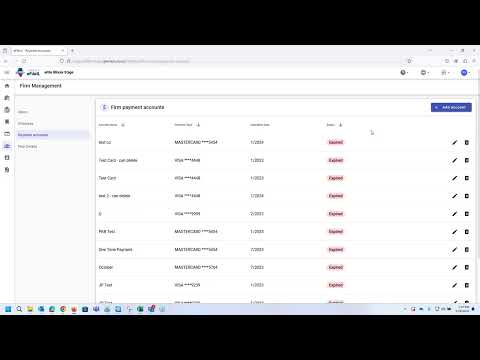
She demonstrated three payment-account types: credit card, eCheck and waiver, and showed how to add or delete accounts. “A waiver must be granted by the court in order for you to use a waiver to waive any court fees,” Peggy said, noting that fee calculations update immediately when a waiver is selected and that verification of payment accounts is typically instant.
The presenter showed how to add attorneys (name and bar number) and filers to a firm account, assign roles such as filer or firm administrator, and remove users with confirmation prompts. She also explained the firm service-contacts function, which acts as a master list filers can attach to cases so those contacts receive notification emails.
On document workflow, Peggy uploaded lead PDFs, emphasized choosing a security classification (nonconfidential or confidential) and advised filers to consult local court clerks about confidentiality rules. She explained the review-and-submit step, submission agreements and what happens after submission: the filing enters the court queue, clerks review documents, accepted lead documents receive a file stamp and the system assigns case and envelope numbers.
Additional services and fees (for example, certification or citation services) can be added during filing; Peggy noted the filing summary and a small window during which a filer can cancel submissions while they are still in a 'submitting' or 'submitted' status. She demonstrated using bookmarks and templates to prefill repetitive data (useful for frequent filings to specific courts such as the Supreme Court of Illinois) and how to file into existing cases by searching case numbers or party names. For existing cases, Peggy stressed that court-saved party information cannot be edited by filers and must be changed only by the court.
The presenter also described filing-history tools: drafts remain visible to filers and can be resumed or deleted; canceled, rejected or accepted filings remain part of the permanent filing history. She closed the session with technical support information: Tyler Technologies filer support at (800) 297-5377, available Monday–Friday, 7 a.m.–7 p.m. Central.
The webinar focused on operational steps and user-interface tips rather than changes to court policy. Filers with procedural or waiver questions were directed to contact their local court clerk or Tyler Technologies support for clarification.