Get email alerts on the Device Registration topic
No spam. Unsubscribe anytime.
State Water Resources Control Board details device registration steps for RWTD portal
Summary
A State Water Resources Control Board staff member outlined step-by-step requirements for adding a device to the RWTD portal, including required fields, certification dates, technology entries and a support contact email.
A State Water Resources Control Board staff member walked users through how to add a device to the RWTD portal, saying the portal requires certain fields and certification dates before a device can be saved.
The staff member said users should first sign into the RWTD portal, open the manufacturer section, select the manufacturer, click the Devices tab, and choose Add Device to begin entering device information.
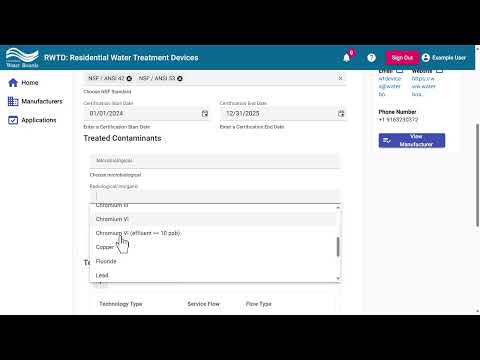
The portal requires the brand name and the system type fields. At least one of the two fields between device name and model number must be completed. Users must select any certifying organization(s) that applied to the device and may select more than one if applicable. The portal also allows selecting any applicable NSF standards.
The staff member noted that a certification start date must be added and that start date must be before the device is added to the portal; a certification end date must also be added and must be after the device is added. The portal includes dropdown menus to identify treated contaminants.
To add technologies, users click the plus button in the technologies table, choose a technology type from the dropdown, then add a rated service flow and a capacity if applicable; at least one of the rated service flow or capacity fields must be completed for each technology. If a device contains multiple technologies, the staff member said users can add them one at a time. If the device has a replacement element, select Yes in the replacement-element dropdown, click the plus button, and enter the replacement element name and capacity if applicable.
After completing required fields and any optional entries, click the check mark box for each added item and then click Save. Once saved, the staff member said the device can be added to future applications.
For assistance, the staff member provided the portal support email: wtdevices@waterboards.ca.gov.
AI generated
The text on this page is AI generated. Summaries, highlights, analysis, and video transcripts are all produced from the original source material.
AI can make mistakes, so if you spot one, and we will fix it for everyone.
Note: the source content is unaltered by us. Any content source we link to, be it a video, an audio recording, or a document, is presented exactly as its publisher released it. That publisher is usually a government body, sometimes an individual official or another organisation.